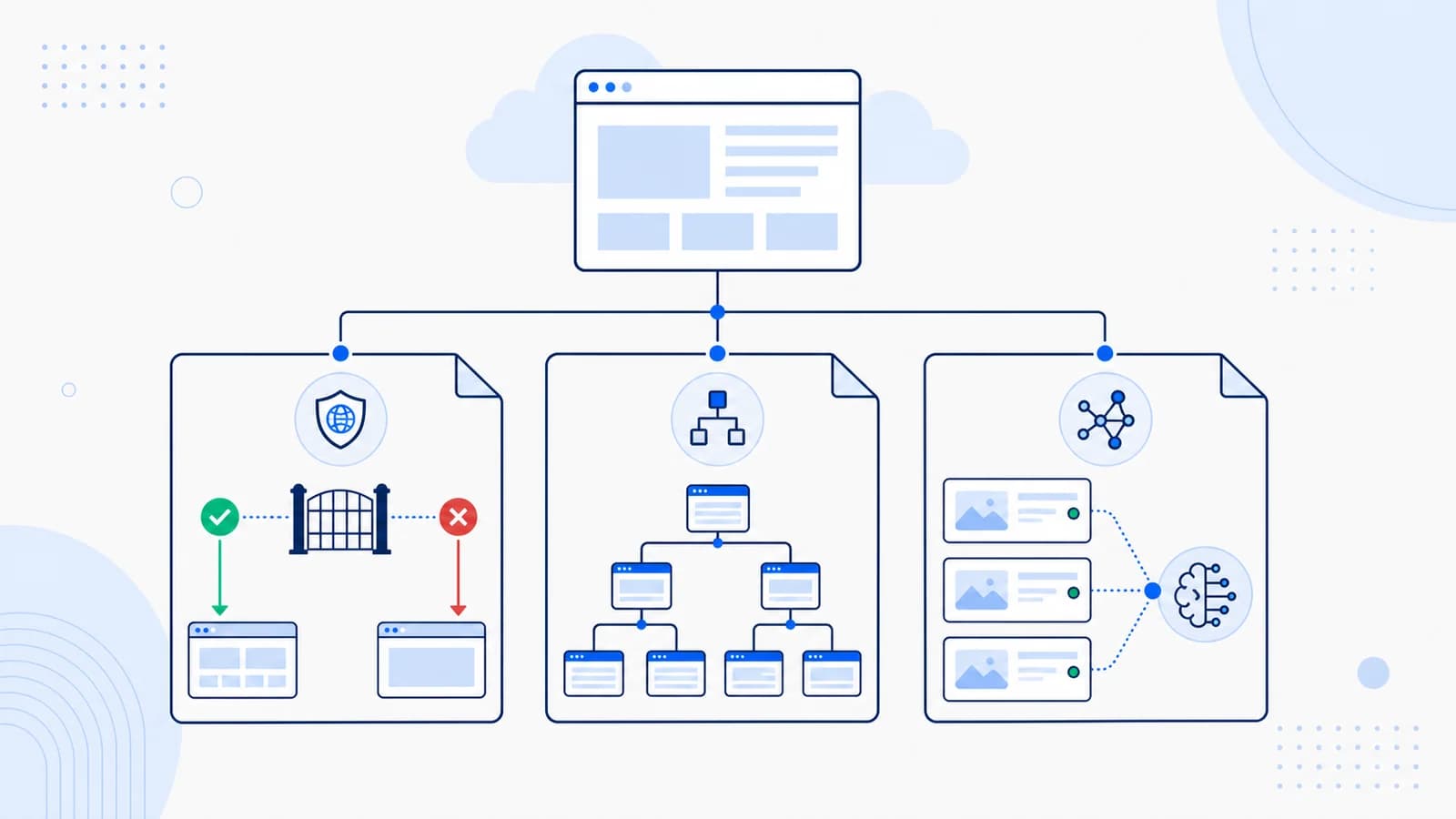
llms.txt vs robots.txt vs sitemap.xml
llms.txt, robots.txt, and sitemap.xml are all machine-readable files, but they solve different problems.
robots.txtdeclares which crawlers may request which paths.sitemap.xmllists canonical URLs a search system may want to discover.llms.txtprovides a curated description and selected resources for language-model workflows.
One file cannot safely replace the others. A site can allow a bot in robots.txt, list a page in its sitemap, and describe that page in llms.txt at the same time.
Quick comparison
| File | Main purpose | Typical consumer | Format | Usually located at | Exhaustive or curated? | Enforced access control? |
|---|---|---|---|---|---|---|
robots.txt | Declare crawl permissions | Web crawlers | Plain-text directives | /robots.txt | Rule-based | No; voluntary protocol |
sitemap.xml | Expose canonical URLs for discovery | Search engines | XML | /sitemap.xml or linked location | Often broad | No |
llms.txt | Describe a site and selected sources | LLM tools and agents | Markdown | /llms.txt | Curated | No |
llms-full.txt | Bundle selected source content | LLM tools and agents | Markdown/text | /llms-full.txt by convention | Curated full text | No |
ai.txt | Express an AI-use policy in some proposals | Varies | Varies | /ai.txt by convention | Policy-oriented | No universal standard |
The presence of a file does not prove that every crawler recognizes or obeys it.
What robots.txt does
robots.txt follows the Robots Exclusion Protocol. It groups rules by user agent and declares allowed or disallowed URL paths.
Example:
User-agent: *
Disallow: /account/
Disallow: /checkout/

User-agent: OAI-SearchBot
Allow: /

Sitemap: https://example.com/sitemap.xml
The file is a crawl policy, not a security boundary. Disallowed URLs may still be known through links, and a malicious client can ignore the rules. Protect private content with authentication and authorization.
Robots rules also do not describe what a product does or which documentation page is authoritative.
What sitemap.xml does
An XML sitemap exposes URLs a site wants search engines to discover.
<?xml version="1.0" encoding="UTF-8"?>
<urlset xmlns="http://www.sitemaps.org/schemas/sitemap/0.9">
  <url>
    <loc>https://example.com/product/</loc>
    <lastmod>2026-07-20</lastmod>
  </url>
</urlset>
A sitemap can scale to large URL sets and multiple sitemap indexes. It is useful for new, deep, media-heavy, or frequently updated sites.
Listing a URL is not an indexing command. The page still needs an appropriate response, canonical signals, useful content, and permitted crawl access. A sitemap should contain canonical, indexable URLs rather than redirects, internal search results, or account pages.
An XML sitemap does not normally explain why each page matters in natural language.
What llms.txt does
llms.txt uses Markdown to identify the site and link to a selected set of resources.
# Example API

> Example API provides address validation for ecommerce checkout systems.

## Documentation

- [Quickstart](https://example.com/docs/quickstart): Authenticate and send a first request.
- [API reference](https://example.com/docs/api): Endpoints, fields, and response codes.
- [Errors](https://example.com/docs/errors): Error meanings and recovery steps.

## Company

- [Pricing](https://example.com/pricing): Plans and usage limits.
- [Security](https://example.com/security): Data handling and infrastructure.
Unlike a sitemap, the file is intentionally selective. Descriptions add context, and sections express an editorial hierarchy.
The proposal is emerging. Do not assume that every AI provider discovers or consumes it automatically.
Is llms.txt a replacement for robots.txt?
No. A link in llms.txt does not grant permission to crawl it.
Consider a documentation page listed in llms.txt but blocked for a crawler in robots.txt. The file says "this resource is useful," while the crawl policy says "this crawler should not request it." The crawler must resolve that conflict according to the protocol and its own behavior.
Keep access decisions in the actual crawl and security layers.
Is llms.txt a replacement for an XML sitemap?
No. A sitemap can expose thousands or millions of canonical URLs efficiently. llms.txt should usually select a much smaller set and explain their roles.
For a store:
- the sitemap may list every canonical product and collection;
- llms.txt may link only to primary categories, buying guides, shipping, returns, and support.
For documentation:
- the sitemap may list every reference page;
- llms.txt may identify the current version, quickstart, core concepts, API index, errors, and changelog.
They can share some URLs without being duplicates because their purpose and format differ.
Where does llms-full.txt fit?
llms-full.txt is commonly used for a compiled text version of selected resources. It can be useful for a focused documentation set or controlled retrieval workflow.
It is not a bigger sitemap. The content should have a defined scope, source attribution, freshness data, and privacy checks. Large dynamic sites may be better served by the short index and canonical pages.
What about ai.txt?
Multiple proposals and implementations use the name ai.txt to express AI-related permissions or preferences. It does not have one universally adopted meaning comparable to the standardized Robots Exclusion Protocol.
If your organization publishes it:
- define exactly what the policy means;
- link to a human-readable policy;
- keep it consistent with contracts, robots rules, and technical enforcement;
- do not assume that a provider will recognize it;
- do not use it as the only protection for sensitive content.
Policy files and content maps serve different roles.
How to resolve conflicting signals
Machine-readable files can disagree. Resolve the underlying configuration rather than assuming a crawler will choose the signal you prefer.
URL is in the sitemap but blocked in robots.txt
The sitemap says the URL is a discovery candidate; robots rules say the crawler should not request it. Remove the URL from the sitemap if it should not be crawled, or change the robots rule if the block is accidental.
URL is in llms.txt but redirects
Replace it with the final canonical destination. Descriptive context is less useful when every client must resolve old URLs, and redirect chains can eventually break.
URL is allowed but returns noindex
Access and indexability are separate. Confirm whether the page should be retrievable but excluded from an index. If it is a priority public source, the noindex may be an accidental template setting.
Sitemap and canonical disagree
List the canonical URL in the sitemap and context files. If an alternate language or format is intentional, use the appropriate canonical and language relationship rather than publishing duplicates without explanation.
robots.txt allows access but the WAF blocks it
The declared policy and technical enforcement conflict. Inspect the CDN or firewall event, verify the crawler identity using current provider guidance, and change the security rule only if the business policy allows access.
File ownership and update triggers
The files often belong to different teams:
| Artifact | Typical owner | Common update trigger |
|---|---|---|
robots.txt | SEO and platform/security | Crawler-policy or route change |
sitemap.xml | CMS/platform | Publish, unpublish, canonical change |
llms.txt | Content/docs with technical review | Authoritative source or product change |
llms-full.txt | Content platform/data pipeline | Any included source revision |
ai.txt or public AI policy | Legal/policy and security | Policy, contract, or enforcement change |
Assign a named owner even when generation is automatic. Automation can publish an incorrect rule or stale source faster than a manual process.
Release checklists should cover:
- staging directives accidentally reaching production;
- migrations that change canonical hosts;
- locale and subdomain changes;
- archived pages remaining in files;
- CDN caching of old robots or text endpoints;
- a physical file overriding an application route;
- malformed XML or Markdown after user-generated content is inserted.
How to validate all files together
Run a cross-file audit rather than checking each endpoint in isolation:
- Build a sample of priority canonical URLs.
- Determine the intended crawler policy for each.
- Confirm its anonymous HTTP response and page directives.
- Check whether it belongs in the sitemap.
- Check whether it is deliberately selected for llms.txt.
- Confirm every referenced URL uses the same canonical destination.
- Test the real CDN path, not only the application origin.
- Store the result and rerun it after deployments.
A conflict report is often more valuable than a pass/fail score. It can say, for example, "12 URLs selected in llms.txt are missing from the canonical sitemap" or "the policy allows OAI-SearchBot, but three documentation paths receive a WAF challenge."
Four practical configurations
Public SaaS website
- Allow intended search crawlers in
robots.txt. - Exclude account, billing, and internal application paths.
- List canonical marketing, docs, and support pages in the sitemap.
- Curate product, pricing, docs, security, and status resources in llms.txt.
Ecommerce store
- Block cart, checkout, account, and faceted duplicates as appropriate.
- Include canonical products and categories in segmented sitemaps.
- Use llms.txt for durable collections, policies, sizing, warranty, and support.
- Avoid placing stale prices in a manually maintained full-text file.
Documentation portal
- Permit current public documentation while excluding private previews.
- Generate a version-aware sitemap.
- Use llms.txt to identify the current version and key entry points.
- Consider llms-full.txt only for a controlled, reasonably sized collection.
Private application
- Require authentication at the server.
- Do not rely on robots.txt to protect data.
- Keep private routes out of public sitemaps and context files.
- Publish only public marketing or documentation resources.
Recommended implementation order
- Protect private resources with real access control.
- Define crawler policy in
robots.txt. - Fix page responses, canonicals, and indexability.
- Generate clean XML sitemaps for canonical pages.
- Publish useful, visible content and matching structured data.
- Add a curated llms.txt if there is an owner and use case.
- Add a full-text bundle only when its scope and update process are clear.
- Monitor logs and validate the files after releases.
Use the llms.txt generator and llms-full.txt generator for draft content, then run a site audit on the deployed result.
Frequently asked questions
Should llms.txt be listed in robots.txt?
It is not required by the proposal. You can make the endpoint easy to discover through documentation and internal links, but do not confuse discovery with a formal sitemap directive.
Can a URL be in both sitemap.xml and llms.txt?
Yes. The sitemap supports broad discovery; llms.txt provides editorial selection and description.
Does Disallow remove a page from search?
Not necessarily. Robots rules control crawling, not guaranteed removal. Use the search engine's documented indexing controls, while ensuring it can access the directive when required.
Is robots.txt legally or technically binding?
It is a voluntary crawler protocol, not authentication. Legal effect depends on jurisdiction and circumstances; use technical access control and legal advice for protected resources.
Which file should I create first?
For most public sites, correct access controls, robots rules, canonical pages, and sitemaps come before llms.txt.
Source notes
- llms.txt proposal: https://llmstxt.org/
- Google robots.txt documentation: https://developers.google.com/search/docs/crawling-indexing/robots/intro
- Sitemaps protocol: https://www.sitemaps.org/protocol.html
- Internal robots guide:
/blog/robots-txt-for-ai-bots/